
Turn parts deliveries into workshop invoices, without anyone logging in
ADAM reads the parts delivery notes a workshop already receives and keeps a running stock figure from them. When a job is done, a mechanic prepares the invoice from a phone, the owner approves it from an email, and ADAM draws the parts down, numbers the invoice and sends it on. Nobody signs into anything.
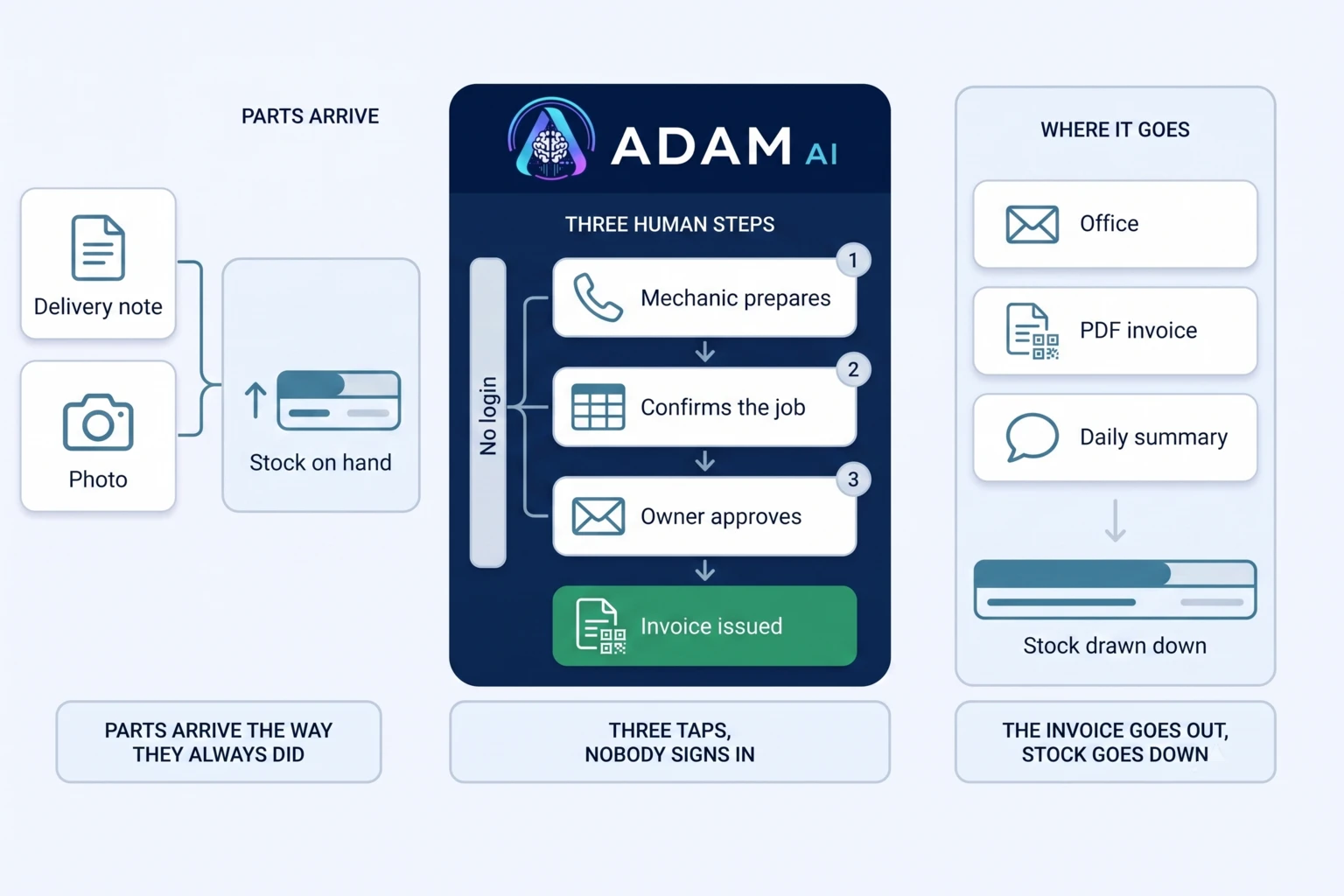
How ADAM connects the parts shelf to the final invoice
The sequence matters. Incoming parts create the derived inventory before an approved job draws against it. The stock pre-flight happens before invoice issuance, while the actual stock decrement waits until the owner approves the completed invoice. Preparation and commitment are separate actions.
Build inventory from incoming parts
Parts delivery notes arrive by email or as photos in a messaging group. ADAM extracts the parts and uses those records to maintain a live derived inventory keyed by supplier and part number.
Pre-flight an approved job against stock
Before an invoice is issued, ADAM checks every part line it could trace back to a delivery note against the stock on hand. If a line asks for more than the workshop has, the approval stops and no invoice is issued.
Prepare the invoice from a phone
A signed link opens a spreadsheet prefilled with current inventory and the services catalogue. The mechanic enters quantities and customer details, then confirms the draft by tapping a cell.
Approve, number and complete the record
The owner approves the completed invoice inside the email. ADAM then draws the matched parts down from stock, allocates the invoice number, renders the PDF invoice and emails it to the office.
The mechanic never opens an application
There is no login on the action page, no portal and no training. A mechanic taps a link on a phone, a prepared sheet opens with the current stock and the services catalogue already in it, and confirming the job is a single tap on a cell. Possession of the signed link is what authorises the action, so nothing has to be provisioned before work can start. The engine underneath is the same one that will match delivery notes to invoices in any industry, applied here to the parts a job actually consumed.
Workshop parts and invoicing FAQ
What does the stock pre-flight check verify before an invoice is issued?
It checks every part line ADAM could trace back to a specific delivery-note line against the stock on hand for that supplier and part number. If any line asks for more than is available the approval stops and no invoice is issued, so the check sits before issuance rather than after it.
How does a mechanic prepare an invoice without logging in?
The mechanic taps a signed link on a phone. It opens a spreadsheet already filled with current inventory and the services catalogue, where quantities and customer details can be entered before a confirm cell is tapped. There is no account or portal on that action page.
Who approves the completed workshop invoice?
The owner receives the completed invoice inline in an email and approves it from that email. Only after that approval does ADAM draw the matched parts down from stock, allocate the invoice number, render the PDF and send it to the office.
When are part quantities removed from the derived inventory?
The stock pre-flight happens before issuance, but inventory is decremented only after the owner has approved the completed invoice. That keeps preparation, approval and the final stock movement in a defined order.
What arrives in the workshop's 18:00 summary?
At 18:00, ADAM posts a PDF summary back to the workshop's messaging group. It covers the day's inbound deliveries and the current stock position, giving the same group that supplies delivery-note photos an end-of-day view.
What happens to a part that ADAM cannot trace back to a delivery note?
It still appears on the invoice, but it is not drawn down from stock. ADAM only deducts parts it can trace to a specific delivery-note line, so a freehand or ambiguous entry is billed without moving the stock figure. The approval screen lists exactly which parts will be deducted, so the difference is visible before the invoice is issued.